What is the Environment in Rstudio?
Answered in Getting Started with R and Rstudio: https://learnadv.com/courses/getting-started-with-r-and-rstudio/lessons/section-0-introduction-to-r-2/topics/0-1-3-the-environment/
The Environment pane
The Environment pane
The environment pane lives on the upper right-hand side of Rstudio by default. The environment allows us to see what objects are saved in R as well as quickly preview their contents.
Running the chunk of code below will add a series of objects to the environment that you can then explore.
num_val <- 2 #A single numeric value
char_val <- "frog" # A single character value
num_vect <- c(1,2,3,4,5) # a vector of numbers
df <- data.frame(col_1 = c(1,2,3,4,5), #A dataframe of 3 columns and 5 rows
col_2 = c('a','b','c','d','e'),
col_3 = c(22.4,23.7,34.2,12.3,45.3))
list <- list(num_val,char_val,num_vect,df) #a list that contains all the previous objects
See screenshot below
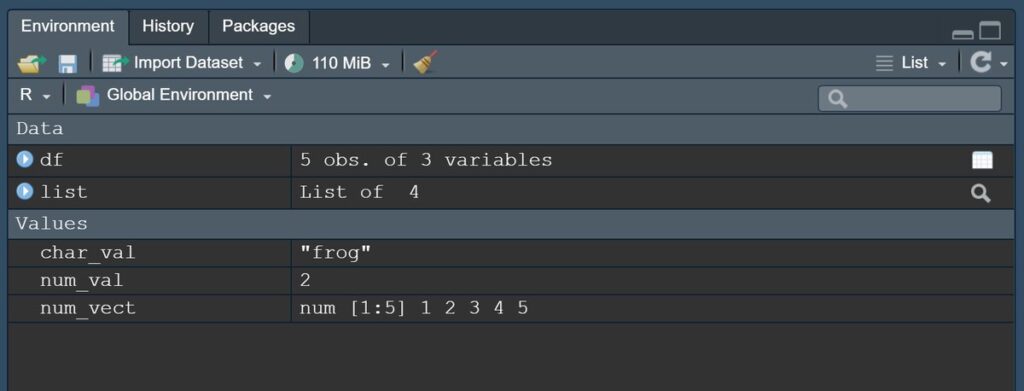
See screenshot below
Related Articles
What do the 4 default panes of Rstudio?
Answered in getting started with R and Rstudio Course: https://learnadv.com/courses/getting-started-with-r-and-rstudio/lessons/section-0-introduction-to-r-2/topics/0-1-2-the-layout-of-rstudio/ How do you use RStudio? What are the 4 default Panes of ...Do I have to download Rstudio to code in R?
Answered in Getting Started with R and Rstudio course at: https://learnadv.com/courses/getting-started-with-r-and-rstudio/lessons/section-0-introduction-to-r-2/topics/0-1-1-what-is-r-and-rstudio/ Technically speaking, you can run just the R ...Where can I download R? Where can I download Rstudio?
Excerpt from the Getting Started with R and Rstudio free-course found here: https://learnadv.com/courses/getting-started-with-r-and-rstudio/lessons/section-0-introduction-to-r-2/topics/0-1-1-what-is-r-and-rstudio/ Installing R To install R you will ...Phi Statistic for Indicator Species
The Phi statistic is often used to represent Indicator Species. For example, the popular R package indicspecies relies heavily on reporting the Phi statistic from Chytrý et. al 2002 Indicator Species are those which signal some feature of the ...How do I set the working directory in R?
Answered in Getting Started with R and RStudio: https://learnadv.com/courses/getting-started-with-r-and-rstudio/ To set the working directory, you'll need the file path. I’ve included a few resources the detail how to find the path for various ...